
This is a sponsored conversation written by me on behalf of Cricut. The opinions and text are all mine.

If you read my blog often, you’ll know that I’m a Cricut mega fan. I work with them as a UK ambassador and represent them on Hochanda TV… but my love of Cricut machines goes beyond just that. I pretty much use my Cricut Maker on a weekly basis; it’s the coolest craft gadget I own!
So when the US Cricut team got in touch to ask me to design my own range of projects for the Cricut Design Space, I jumped at the chance! I actually started work on these designs waaay back before Christmas, so it’s great to finally be able to share them with you.
And while you’re here, be sure to read my ultimate guide to Cricut machines. It’ll help you decide which Cricut model is perfect for you.
The Crafty Gentleman x Cricut Design Space
What is Cricut Design Space?
Cricut Design Space is the software that powers the Cricut range of cutting machines. It’s also home to a gigantic library of images, projects, fonts and designs – all of which can be cut on a Cricut machine at the press of a button. It’s magic.
Of course, you can make your own projects from scratch, too – but if you’re short on time (or ideas), then Design Space has your back (there’s 100,000+ projects and images to choose from!).
Read more about Design Space in my guide to which Cricut machine you should buy.

My Design Space projects: the Crafter’s Uniform set
The Cricut team challenged me to make a set of matching T-Shirt designs, based on a theme I love. So obviously I chose crafts. 🙂
I was inspired by my baby nephew and all of my friends who have had babies recently – I can’t wait to teach them craft skills and get creative with them! So, I designed a set of uniforms as the perfect outfit for a crafternoon.


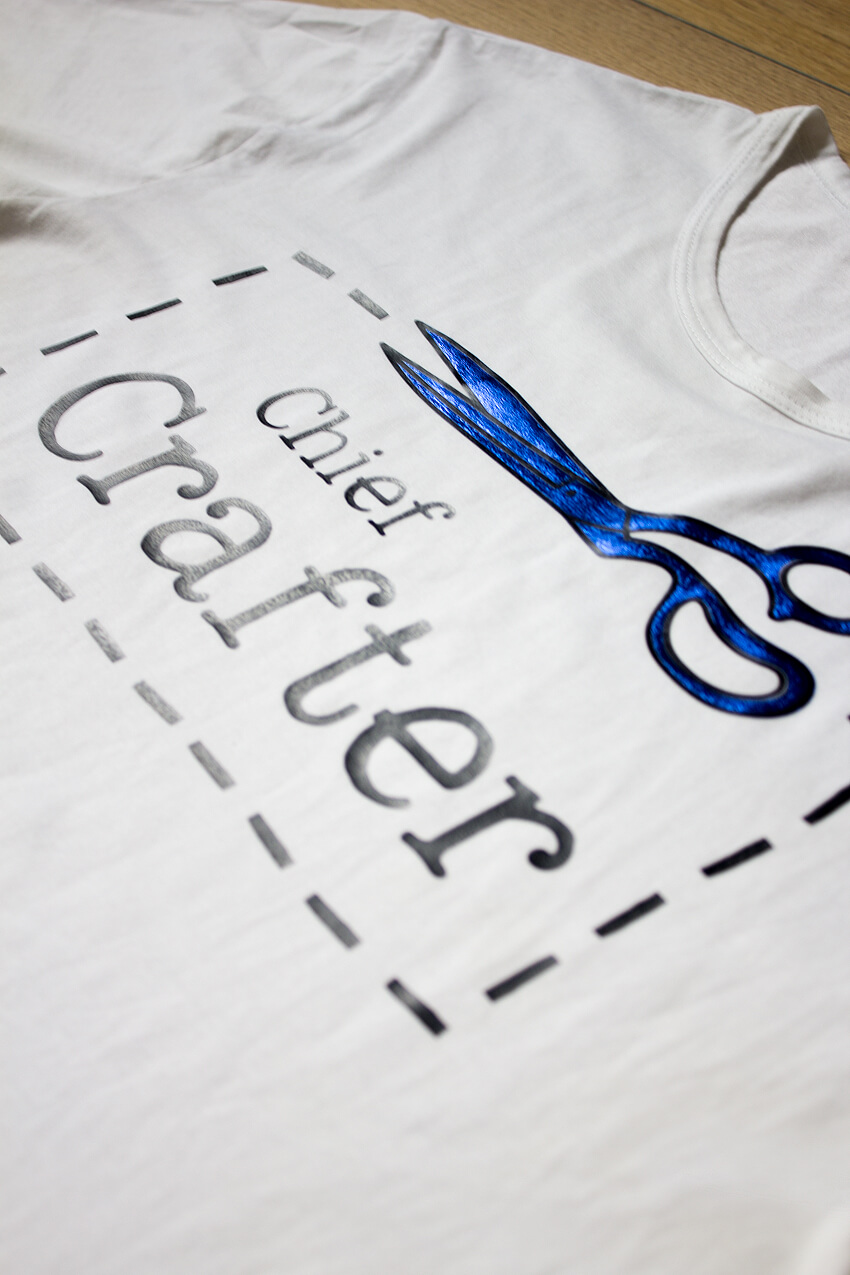
I love how the T-Shirt slogans grow with age… starting with a “Crafter-In-Training” baby grow, then an “Assistant Crafter” kid’s T-Shirt, before being promoted to a fully-fledged “Chief Crafter” adult T-Shirt!
Whilst the designs are made for a baby grow, child’s T-Shirt and adult’s T-Shirt, each one is totally customisable. So if you wanted to make a “Crafter In Training” T-Shirt for an adult, you can easily resize the design to fit.
I love the idea of craft groups wearing these for a meetup or a workshop!
How can you make these projects yourself?
You’ll need a Cricut to make these projects. I’d recommend the Maker, but the Explore Air 2 is also an incredible cutting machine. Once you’re set up, it’s simply a case of purchasing the designs and following the instructions to make them!
You can use whatever iron-on you like. I went for a metallic blue with matt black outlines and text – but you could use glitter iron-on, neons, monochrome… whatever you fancy! Also, feel free to mix it up by applying the designs to different coloured T-Shirts, or even jumpers and hoodies.
The projects will be available on Cricut Design Space (affiliate link) later this week. I’ll update this blog post when they’re live!
Happy Cricut-ing! – Mike




5 Comments
Heather
June 28, 2019 at 10:13 pmIf you are able to edit my name please do and remove my suname,,, auto fill.. sorry!
Heather
June 28, 2019 at 10:10 pmI found these in the Cricut library the other day and can’t stop thinking about them but now I’m having no luck in finding them again, I’ve searched all the key words etc. :{
Can you point me in the right direction please!!
Mike
July 1, 2019 at 3:37 pmHi Heather! Thank you so much – I’m so glad you like my designs! The names of the files are: “Chief Crafter T-Shirt”, “Assistant Crafter T-Shirt” and “Crafter in Training Baby Bodysuit”. If you search for them, you should find them! Let me know if you’re still struggling though. 🙂 – Mike
Shirl
March 18, 2019 at 11:50 pmLove these, Mike! Thanks!
Mike
March 19, 2019 at 8:59 amSo glad you like them!